#3dprint

35 posts · Last used 20d

Wir besitzen mehrere 3D Drucker auf denen wir auch sehr oft, mehrmals täglich Dinge drucken. Mich hat es tierisch genervt, dass man ständig auf mehreren Rechnern (mein Rechner, der meiner Frau und der Rechner im Technikraum) alle Slicer Profile (wir nutzten bisher immer PrusaSlicer) anpassen musste, wenn man auf einem Rechner etwas angepasst hat. Sicher, ich hätte das auch mit einer gesharten Konfiguration lösen können. Zusätzlich fand ich die ganzen Slicer, egal ob Prusa, Creality, Cura und welche es sonst noch gibt, immer viel zu überladen mit Einstellungsmöglichkeiten, die man meistens gar nicht braucht. Und, es gab keine Möglichkeit, die vielen Druckdateien irgendwie zu verwalten, sich die schön als Vorschau anzeigen zu lassen, zu taggen, in Projekte zu verpacken, etc. Also habe ich mich hingesetzt und einfach mal etwas eigenes gebaut: 3D Vault: eine kleine Weboberfläche, die bei mir zuhause läuft und alle unsere STL- und Blend-Dateien aus dem gemeinsamen Nextcloud-Ordner automatisch einliest, mit echten Vorschaubildern katalogisiert und durchsuchbar macht. Duplikate, mehrere Versionen derselben Datei, Downloads von Thingiverse oder Printables samt Lizenzinfos: wird alles automatisch erkannt und lässt sich taggen, in Projekte packen und wiederfinden, ohne dass ich mich noch an einen Dateinamen erinnern muss. Der eigentliche Kern ist die virtuelle Druckplatte direkt im Browser. Ich lege ein oder mehrere Teile per Drag&Drop drauf, drehe und skaliere sie einzeln pro Achse, wähle Infill, Stützstruktur und eins von unseren Druckerprofilen aus, und schicke das Ganze zum Slicen. PrusaSlicer läuft dabei im Hintergrund auf dem Server. Am Ende bekomme ich fertigen G-Code zum Download oder direkt per Klick an den passenden Drucker geschickt, mit Live-Fortschritt. Kein Rechner muss mehr manuell synchron gehalten werden, weil es nur noch einen Ort gibt, an dem die Profile liegen. Und meine Frau loggt sich einfach mit ihrem eigenen Zugang ein und druckt genauso, ohne dass ich ihr vorher irgendwas installieren oder abgleichen muss. Was meint ihr? Ist es das wert, das Ding zu veröffentlichen? :-) #3ddruck #3dprint #creality #prusa #cura #slicer #slicingsoftware #ender

24
8
7
0
Replying to
My idea this morning is to take this out of the obvious #Bicycle options and look at #motorbike instead. And I find many #3dprint options for a throttle assist. I am printing one out now to try and maybe modify. It seems like basic point to start from for a support for what I need.
1
5
0
0
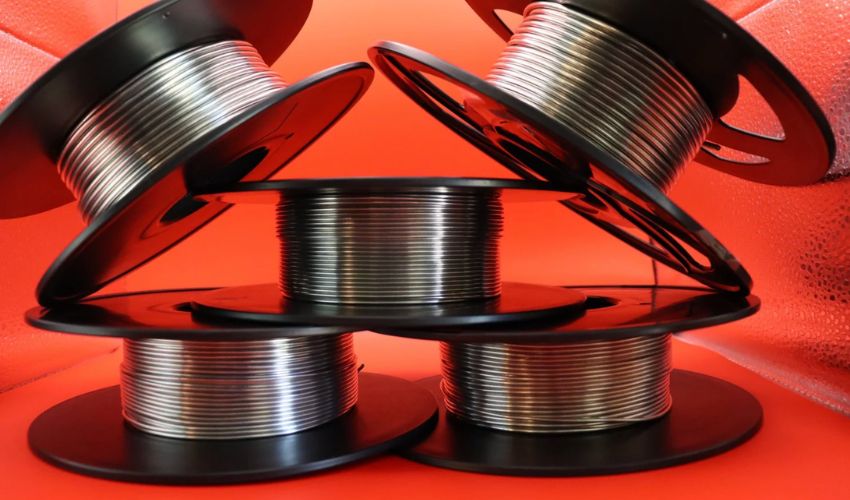
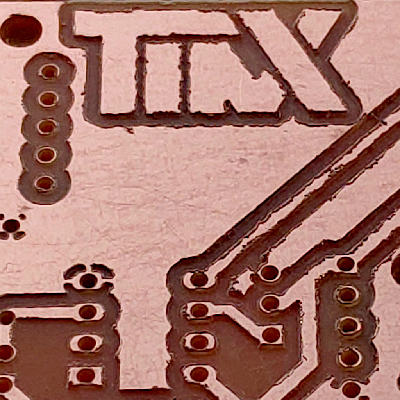
Kupros has launched Cu29, a conductive copper filament for FDM 3D printing that enables electronics prototyping without specialised equipment. The startup overcame skepticism from experts who claimed copper could never be 3D printed. Cu29 allows makers to create conductive traces on standard desktop printers. https://www.3dnatives.com/en/3dstartup-kupros-filament-cu29/ #3Dprint #3Dprinting #Materials
1
0
1
0
Dutch firm Hembased has launched a cold compostable 3D printing filament made from palm leaf agricultural waste. The material degrades in 20-30C temperatures within a year in standard compost bins, offering a sustainable alternative to conventional filaments. Available from 36 USD per kilo. https://3dprint.com/328883/hembased-launches-compostable-filament-made-out-of-palm-leaves/ #3Dprint #3Dprinting #Materials
0
0
2
0
Replying to
BTW, I've been using it as a streaming radio station player. The speakers are not great/not terrible but it gives a vintage radio quality to it which is charming. I wrote my first Python program that uses curses to make a console driven radio player 😎 It lasted 7 hours 47 minutes on one charge (with the display on!) using 2 x 3000mAh 18650s. #Cyberdeck #RaspberryPi #Maker #3Dprint
38
5
4
0
Replying to
Added a visor to the top of the LCD and now it's giving Weyland-Yutani vibes 👾 #CyberDeck #Maker #3DPrint #RaspberryPi #Pimoroni Alien #Nostromo
75
3
14
0
Replying to
I wanted to add a scroll wheel and after a few ideas, I settled on this USB rotary encoder adapter by Adafruit. Make a small case for it and a large wheel and now I can scroll through my radio list quickly! It emulates a keyboard so it sends arrow up and down presses so it should work with lots of things. Push in on the wheel sends a return. Flying USB cable because it’s an accessory 😄 #CyberDeck #RaspberryPi #Maker #3DPrint
69
4
16
0
🖨️ Du wolltest schon immer mal was 3D-drucken? Im SLUB Makerspace lernst du, wie das geht! Den Einstieg bekommst du in betreuten Terminen. Beim Geräteführerschein lernst du dann alles, was du brauchst, um selbstständig zu drucken. 💪 Alle Kurse sind kostenlos (nur Materialkosten fallen an). Komm heute (08.07.) um 16 Uhr zum Workshop vorbei: Da dreht sich alles um (recyceltes) Plastik. 👉 Jetzt anmelden: 🔗 https://www.slubdd.de/maker #SLUBMakerspace #3Dprint #Makerspace #Dresden
7
2
3
0